
Cookie Consent Banners in 2026: 8 Live Checks for Fair Choice and Real Blocking
When people search for cookie consent banners, they are often chasing an answer to a bigger systems question: where does consent logic live, how does it propagate, and what breaks when the stack changes underneath it?
Use the linked DataShyre references for surrounding context, then focus on implementation flow, technical dependencies, and release checks that keep the control path stable.
That framing matches the current official material. The European Commission still says consent must come through an affirmative act, use “clear and plain language,” and be withdrawable in a way that is “as easy to use as giving consent.” The UK’s ICO says that if users do not click any option and simply move through the site, the technologies that require consent must not run. France’s CNIL said on December 12, 2024 that “rejecting cookies should be just as easy as accepting them.” And California’s CPPA still warns businesses to offer “symmetrical choices” and easy-to-understand privacy controls.
If you want nearby context first, start with these guides to cookie consent requirements, cookie consent banner examples, and website privacy checker. This article stays focused on the live review I would use this week before trusting cookie consent banners on a production site.

1. Judge the banner by behavior, not by polish
Many cookie consent banners look modern and still fail the actual test.
The European Commission’s consent guidance remains practical: the request has to be specific, visible, and tied to a real affirmative act. The ICO’s current storage-and-access guidance is just as operational. If the relevant exception does not apply, prior consent is needed before the technology runs.
So the first review question should not be, Does this banner look professional?
It should be:
- what technologies is this banner supposed to govern;
- what happens before any click;
- what changes after reject;
- what changes after accept; and
- what changes after withdrawal.
If those states are not technically different, the banner is decorative rather than controlling.
2. Make reject as obvious as accept
This is still the clearest single test for cookie consent banners.
The CNIL’s December 2024 notice said cookie banners become misleading when the design nudges people toward acceptance and that “rejecting cookies should be just as easy as accepting them.” The ICO now uses nearly the same standard in its own consent-mechanism checklist: it expects it to be as easy to refuse consent as it is to accept.
That means reviewing more than button labels. Check whether:
Reject allappears on the first layer whereAccept allappears;- both actions are equally legible on mobile;
- color, spacing, and font weight do not quietly steer the user;
- acceptance is not repeated while refusal is hidden or diluted; and
- refusal language is direct instead of vague.
Bad cookie consent banners often fail through layout, not wording.
3. Do not count scrolling, silence, or continued browsing as consent
This point should be settled by now, but it still breaks on live sites.
The European Commission says valid consent requires a clear affirmative act. The ICO is equally explicit in current guidance: if users do not click one of the available options and go to another part of the website, you must not use the technologies that require consent. Silence or inactivity does not qualify.
For cookie consent banners, that creates a simple runtime test:
- open a fresh session;
- click nothing;
- move to another page;
- inspect network activity and storage; and
- confirm that optional analytics, advertising, and similar technologies did not already start.
If the site interprets passivity as consent, the banner is already out of line with current regulator guidance.
4. Write the first layer in language a normal person can parse quickly
Good cookie consent banners do not hide behind soft, generic phrasing.
The European Commission still says the consent request should use “clear and plain language.” CNIL also says the banner information must be clear and complete, including the purpose of the cookies and how to reject them.
In real deployments, the first layer should usually tell the visitor:
- what optional tracking or storage is being requested;
- why those categories exist in plain English;
- whether third parties are involved; and
- where settings can be revisited later.
The goal is not maximum legal detail on screen one. It is a truthful first summary that matches the deeper settings and the actual runtime behavior.
5. Check the mobile version as if it were the primary experience
This is where otherwise decent cookie consent banners often fail.
The ICO warns that banners or message boxes designed for desktop can become hard to read or use on mobile, and that this can undermine consent validity because the information is difficult to access. That matters because many teams still review consent only on a wide laptop viewport.
On mobile, test whether:
- the text is readable without awkward zooming;
- the reject path is visible without hunting;
- the controls are large enough to tap deliberately;
- the second layer remains understandable without endless scrolling; and
- fixed-position elements do not cover key actions.
If mobile refusal feels meaningfully harder than mobile acceptance, the banner needs work even if the desktop version looks balanced.
6. Keep granular settings off by default unless a category is truly necessary
The first layer is only half the story. The second layer is where many cookie consent banners quietly break.
The ICO’s consent checklist expects control over all non-exempt technologies, and its good-practice examples show non-essential choices turned off by default. The Commission’s consent guidance points in the same direction by requiring a specific, informed, affirmative act.
That means the settings layer should be reviewed for:
- category descriptions that make sense to non-specialists;
- non-essential toggles that are off until the person changes them;
- a save action that actually stores the chosen state;
- separate handling for necessary functions that do not rely on optional consent; and
- visible access to third-party identities when data will be shared.
If a banner calls the flow customize but the meaningful choices are already enabled, the user is not really customizing anything.
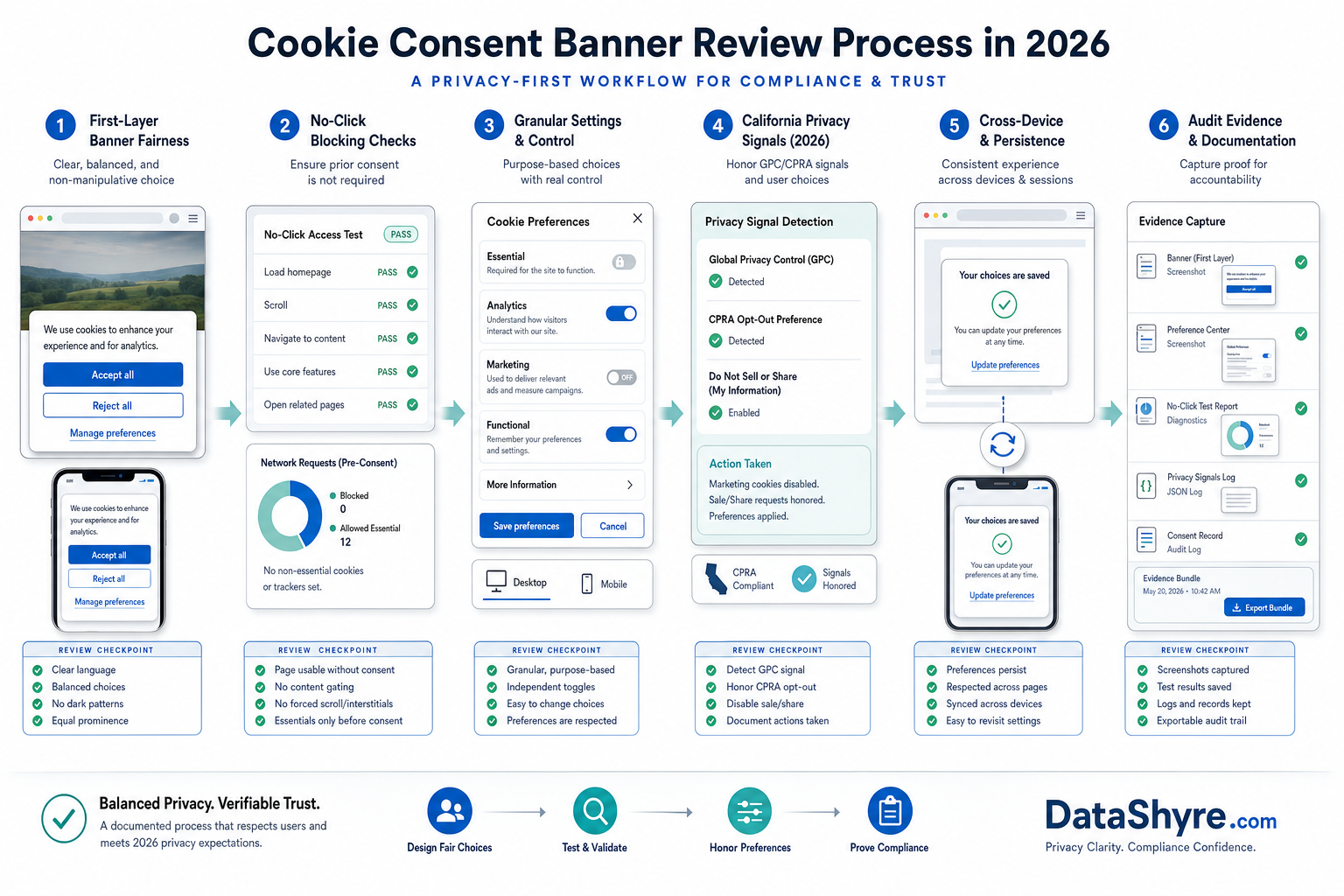
7. Treat California privacy choices as a separate branch
Not every cookie conversation is an EU or UK prior-consent conversation.
California’s current CCPA materials still say consumers have the right to opt out of sale or sharing, including via a user-enabled Global Privacy Control. The CPPA FAQ says businesses must honor qualifying opt-out preference signals, and the CPPA’s dark-pattern advisory tells businesses to use clear language and “symmetrical choices.”
So if your cookie consent banners are shown to California visitors, test a separate branch for:
- opt-out of sale or sharing logic where it applies;
- handling of browser-based opt-out preference signals;
- clarity of any
Your Privacy Choicespath; - whether the interface creates friction around privacy-protective choices; and
- whether the site’s downstream behavior changes when that choice is exercised.
Trying to force every jurisdiction into one banner script usually hides important differences instead of solving them.
8. Save evidence that another person can verify later
The strongest cookie consent banners are the ones your team can still explain after the next redesign, tag change, or vendor addition.
At minimum, I would keep:
- desktop and mobile screenshots of the first and second layers;
- notes from no-click, reject, accept, and withdrawal tests;
- a short record of which optional technologies fired in each state;
- any California-specific or region-specific branch notes; and
- the release date or ticket connected to the review.
That turns a banner review into a repeatable control instead of a one-time visual signoff.
A short review order for this week
If I were checking cookie consent banners today, I would do it in this order:
- test the no-click state first;
- compare accept and reject prominence on desktop and mobile;
- review the wording for plain-language accuracy;
- inspect the settings layer and default toggle states;
- test withdrawal and reopened settings;
- run any California privacy-choice branch that applies; and
- archive proof before the next release changes the page.
That sequence usually finds the real gap faster than another round of design tweaks.
FAQ
Do all cookie consent banners need a reject button on the first layer?
The safest current direction from regulators is yes when you are asking for consent for non-essential technologies. Both CNIL and the ICO emphasize that refusal should be as easy as acceptance.
Can a banner be compliant if optional tags fire before the user clicks anything?
No for consent-dependent technologies. Current Commission and ICO materials both point toward affirmative action before those non-exempt technologies run.
Is a California privacy banner the same thing as an EU cookie banner?
Not necessarily. California often turns on opt-out and preference-signal handling, while EU and UK analysis often turns first on prior consent for non-essential storage or access technologies.
Bottom line
The best cookie consent banners in 2026 are not the prettiest ones.
They are the ones that make refusal as real as acceptance, wait for a true affirmative choice, stay usable on mobile, keep non-essential controls off by default, handle California privacy choices separately where needed, and leave behind enough proof for someone else to verify the runtime later.
The strongest outcome for cookie consent banners is not a prettier banner. It is a cleaner control path from user choice to technical enforcement.
Sources
- European Commission, Legal grounds for processing data: https://commission.europa.eu/law/law-topic/data-protection/information-business-and-organisations/legal-grounds-processing-data_en
- Information Commissioner’s Office, How do we manage consent in practice?: https://ico.org.uk/for-organisations/direct-marketing-and-privacy-and-electronic-communications/guidance-on-the-use-of-storage-and-access-technologies/how-do-we-manage-consent-in-practice/
- Information Commissioner’s Office, Guidance on the use of storage and access technologies: https://ico.org.uk/for-organisations/direct-marketing-and-privacy-and-electronic-communications/guidance-on-the-use-of-storage-and-access-technologies/
- CNIL, Dark Patterns in Cookie Banners: CNIL issues formal notice to website publishers: https://www.cnil.fr/en/dark-patterns-cookie-banners-cnil-issues-formal-notice-website-publishers
- California Privacy Protection Agency, Frequently Asked Questions (FAQs): https://cppa.ca.gov/faq
- California Privacy Protection Agency, Enforcement Advisory No. 2024-02: https://cppa.ca.gov/pdf/enfadvisory202402.pdf
- California Department of Justice, California Consumer Privacy Act (CCPA): https://oag.ca.gov/privacy/ccpa
—
Published: October 25, 2026. Updated using current official regulator and government materials available at publication time.